


Billiards Legend: Pocket Games
4.5239.00 Reviews
App Specs
- Version
- 1.7.4
- Updated On
- License
- Free
- Downloads
- 100,000+
- Developer
- Mentha X Games
- Categories
- Sports
- Platform
- Android
Screenshots

 Analysis by AppCompare
I started with Billiards 8 Ball: Pool Games expecting a quick way to play a familiar table game on my phone, and that is the most useful way to approach it: learn the feel of a shot, enjoy a short match, and decide whether you want a relaxed solo session or the added pressure of playing online. It is a free sports game from Mentha X Games, rated Everyone, with a 4.7 average from around 2,100 ratings and over 100,000 installs. It was released on June 9, 2025, and version 1.6.3 is listed for Android 6.0 and up. Those figures suggest a well-liked, established starting point, though they do not tell you whether its particular style of play will suit you.
What to expect from a phone-sized pool table
The appeal is immediate: an eight-ball match is easy to understand, but making a good shot still takes care. The game presents a clean, straightforward table rather than asking me to learn a complicated sports simulation. I could focus on lining up a shot and seeing what happened, which makes it approachable if you have never played pool on a touchscreen before.
The main adjustment is that aiming with a finger is not exactly like standing over a real table. A small movement can change the line of a shot, so I found it helpful to slow down rather than drag and release in a hurry. That difference is not necessarily a flaw; it is simply part of playing billiards on a phone. If you want a detailed, realistic training tool for tournament technique, a casual mobile game may not be the best substitute. If you want a familiar game you can pick up without much preparation, the format makes sense.
The game’s strongest early advantage is that it gets you into the basic rhythm quickly: assess the table, choose a ball, aim, and take the shot. I would treat the first few turns as practice even if you already know the rules. Getting comfortable with the touchscreen is more valuable than trying to win immediately, especially when the cue and table occupy a smaller space than a physical setup.
Getting through setup and your first useful match
After installing it, I would begin with a solo game or practice session if one is available in the menu, rather than making my first attempt a competitive online match. That gives you room to test how aiming responds on your device and to see how much time you need to line up a shot. The current version is 1.6.3, and the game is free to download, so trying a short session does not require an upfront purchase. In-app purchases range from $0.99 to $99.99 per item, so I would look carefully at any purchase prompt and decide whether an optional item is actually worth it to me.
For a first meaningful success, set a modest goal: make a legal shot that sends the ball you intended toward a pocket, rather than trying to clear the table in one turn. Before releasing, pause to check the cue direction and the path of the target ball. If the shot misses, change one thing at a time on the next attempt—your aim, the angle, or how you pull back—so you can tell what made the difference. That small habit turns an ordinary match into useful practice.
One practical tip is to avoid making your first session a test of how quickly you can play. A rushed shot can make the controls seem less predictable than they are. I got more out of taking a moment to line up each attempt and watching where the balls finished. In a game like this, the result of a shot teaches you more than simply tapping through turns.
Worth Reading Before You Choose

EA SPORTS FC Mobile 26 Is a Bigger Football Game, but It Takes Time

Flipboard Shows What News Apps Must Do Beyond the Feed

Switching to Android Auto Means Rethinking Your Driving Routine

Google Calendar Makes a Crowded Week Easier to Manage

Ludo King Makes the Most of the Minutes Between Plans

Baby Panda World Brings Quick Play to Modern Phones, but Its Game Library Feels Busy
First Impressions and Gameplay
As soon as I launched the Billiards 8 Ball: Pool Games app, I was greeted with a sleek and straightforward interface. It’s got that no-nonsense vibe that makes it easy for anyone to dive right into a game. The graphics are pretty impressive—crisp and clean without being overly flashy. It feels like you’re holding a mini pool table right in your hands.
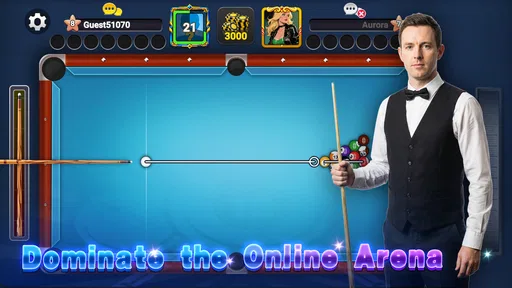
The gameplay itself is intuitive. Whether you’re a seasoned pool player or a total newbie, you’ll find the controls easy to master. Just drag and release to shoot, and you’re off. There’s a satisfying realism to how the balls move and interact, which adds to the immersion.
Making the most of solo and online play
For me, solo play is the sensible place to build confidence. It lets you concentrate on the table and your own decisions without adding the social pressure of an opponent waiting for a turn. The AI is challenging enough to keep things interesting but not so difficult that it feels impossible to win. That balance is useful for someone who wants a casual contest, though players looking for a demanding competitive simulation may eventually want tougher opposition.
Online play serves a different purpose: it gives a match a human edge and makes each turn feel more consequential. I would save it for after I had tested the controls and understood the basic pace of a game. An everyday example is a short break when you have enough time to finish a match but do not want to commit to a longer session; solo play is the lower-pressure choice, while online is better when you actively want a contest. If you are playing in a noisy or interrupted setting, though, a pause in concentration can affect a shot, so a quick solo session may be the more comfortable option.
Practice is most useful when you give it a specific purpose. Instead of replaying shots without thinking, try to notice whether you tend to aim too far to one side or release before you are satisfied with the line. That is a simple way to make a few minutes feel productive. It also helps separate two different problems: choosing a sensible target and physically lining up the shot on the screen.
Reading the competition and choosing what to customize
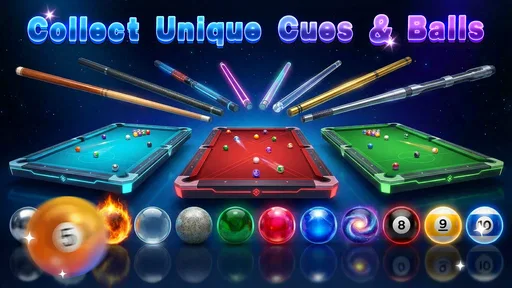
Customization adds a personal touch, but I would treat cues and tables as a secondary reason to keep playing rather than the main attraction. The game offers items to unlock as you progress, which gives a little extra incentive to return. When you encounter a new cue, try to judge it by how it feels during play instead of assuming that a different appearance will automatically make every shot better. The practical value is in finding a setup you enjoy using, not in collecting items for their own sake.
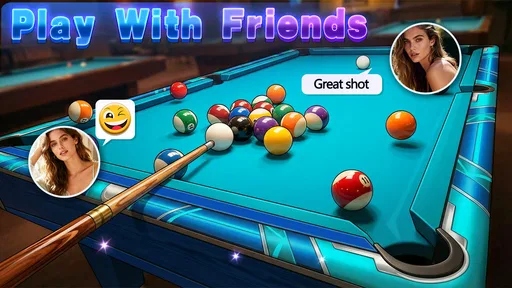
The chat function can make multiplayer feel more social, but it also changes the mood of a match. If you enjoy friendly interaction, it can make a routine game more lively. If you would rather focus on your aim, you do not need to treat chat as part of the challenge; keep your attention on the table and play at your own pace. This is one reason I would not recommend online matches as the first thing to try if you are still learning how the controls respond.
Compared with the usual alternatives in mobile billiards, this game’s straightforward presentation is its clearest advantage for a newcomer: it aims to make a familiar eight-ball match easy to start rather than burying the table under complicated presentation. A more feature-heavy pool game may be a better choice if you want extensive progression or a deep competitive structure, while a physical table is obviously better for practicing real-world stance and cue handling. This one sits in between those options as an accessible way to play on a phone, with online competition when you want more than a solo match.
Common points of confusion before you settle in
The first thing I would not assume is that knowing the rules of pool means the touch controls will feel natural right away. The screen changes how you judge distance and direction, and a shot that seems obvious in your head may need a small adjustment on the display. Give yourself a few attempts before deciding that you are bad at the game. A missed shot can be useful feedback about your aim rather than proof that the controls are impossible.
It is also worth separating the free download from optional spending. You can try the game without paying to install it, but in-app purchases are available, with items priced from $0.99 to $99.99. I would not buy anything just because it appears while you are getting started. First find out whether you enjoy the basic match loop; only then consider whether an optional purchase adds something you personally want. That approach is especially sensible if you are installing it for a child, even though the content rating is Everyone.
Another reasonable question is whether this is better for solo play or competing with others. I would say it depends on what you want from a particular session. Solo play is useful for getting comfortable and keeping the mood relaxed; online matches bring unpredictability and a social element. If you want a game to leave open while doing something else, neither format is ideal for focused shot-making, but a brief solo session is easier to control than a competitive match.
Who will enjoy it, and who may want something else
I think this is a good fit for someone who already likes eight-ball, wants a familiar game on a phone, or is curious about billiards but does not want a long tutorial before taking a shot. It also suits players who enjoy alternating between casual solo practice and online competition. The combination gives a beginner a gentler route in while leaving a more social option for when the basic controls feel comfortable.
I would point experienced players elsewhere if their main goal is to reproduce the physical precision of a real cue, or if they need a highly demanding competitive environment. A phone game cannot replace the feel of a table, and a simple interface may seem too pared back for players who want a large suite of advanced systems. Likewise, if you dislike touch-based aiming or prefer games with little focus on individual accuracy, the central activity here may become repetitive rather than relaxing.
For a first-time player, my suggested next step is simple: start with a low-pressure game, take deliberate shots, and notice what the screen teaches you about your aim. Once you can line up a shot without rushing, try a match against another player if you want that extra challenge. You do not need to chase unlocks or spend money to find out whether the game’s core appeal works for you. If the satisfying part is choosing a target and seeing a clean shot play out, there is a good reason to keep it installed.
Game Modes Galore
What I really appreciate about this app is the variety of game modes. You can play solo to hone your skills or challenge your friends in multiplayer mode. I tried my hand at a few solo games, and it was a blast. The AI is challenging enough to keep things interesting but not so difficult that it feels impossible to win.
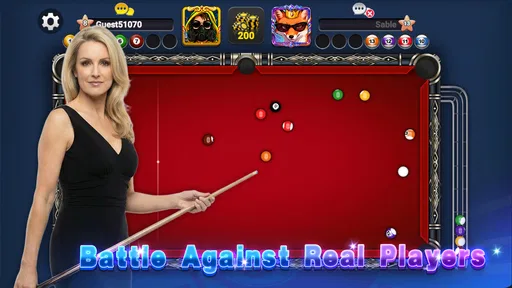
If you’re feeling competitive, dive into the online multiplayer mode. It’s a great way to test your skills against players from around the world. I found myself getting pretty hooked, trying to climb the leaderboards. There’s also a practice mode, which is perfect if you’re looking to improve your technique without the pressure of a real game.
Customization and Features
Let’s talk about customization because who doesn’t love a bit of personalization? The app offers a range of cues and tables to choose from, which you can unlock as you progress. It’s a nice touch that adds a bit of flair to your games. I enjoyed experimenting with different cues—each one feels unique and adds a different dynamic to your shots.
Another feature worth mentioning is the chat function in multiplayer mode. It adds a social element to the game, allowing you to interact with opponents. It’s mostly friendly banter, but it definitely makes the matches feel more engaging.
The Verdict
Overall, Billiards 8 Ball: Pool Games is a fantastic app for anyone who loves pool or is looking to get into it. It’s got a great balance of challenge and fun, and the variety of game modes means you won’t easily get bored. Plus, the customization options are a nice bonus to keep things fresh.
If you’re ready to take your pool game to the next level, give this app a shot. Whether you’re playing a quick solo game on your lunch break or diving into a competitive online match, you’re bound to have a good time. So grab your virtual cue, and let’s shoot some pool!
Pros
- Realistic physics enhance gameplay.
- Variety of customizable cues and tables.
- Multiplayer mode is smooth and engaging.
- Daily challenges keep players returning.
- Intuitive controls for easy play.
Cons
- In-app ads can be intrusive.
- Limited offline gameplay options.
- Occasional lag in multiplayer mode.
- Some features require in-app purchases.
- Graphics could be more polished.
FAQs for Billiards Legend: Pocket Games
What are the key features of Billiards 8 Ball: Pool Games?
Billiards 8 Ball: Pool Games offers realistic physics, stunning graphics, and a wide range of tables and cues to choose from. Players can enjoy both single-player and multiplayer modes. The game also features tournaments, a practice mode, and leaderboards to track your progress and compete with friends.
Is Billiards 8 Ball: Pool Games free to play?
Yes, Billiards 8 Ball: Pool Games is free to play. However, it includes in-app purchases for items such as premium cues, exclusive tables, and cosmetic upgrades. While these purchases enhance the gaming experience, they are not necessary to enjoy the full game.
Can I play Billiards 8 Ball: Pool Games offline?
Billiards 8 Ball: Pool Games can be played offline in single-player mode, allowing you to practice and improve your skills. However, to access multiplayer features, leaderboards, and tournaments, an internet connection is required. This ensures a more competitive and interactive gaming experience.
How realistic is the gameplay in Billiards 8 Ball: Pool Games?
The game prides itself on delivering a highly realistic billiards experience. With carefully designed physics, the ball movements mimic real-life scenarios. The touch controls are intuitive, allowing for precise shots and strategic play, making it an excellent choice for both casual and serious billiards enthusiasts.
What devices are compatible with Billiards 8 Ball: Pool Games?
Billiards 8 Ball: Pool Games is compatible with a wide range of Android and iOS devices. It requires a minimum operating system of Android 5.0 or iOS 10.0. The game is optimized to run smoothly on both smartphones and tablets, providing a seamless gaming experience across different devices.


